Protocol Overview
Marinade Instant Unstake
Learn how Instant Unstake works, when to use it, and how it differs from delayed unstaking.
Overview
Instant Unstake lets you exit your staking position immediately instead of waiting for the usual one-epoch unlock on Solana.
Instead of scheduling your stake to deactivate and coming back later to claim, Instant Unstake sells your position for SOL, usually within a few seconds.
It works for both:
- Native staking (Marinade Native, Select and Recipes positions, and other native stake accounts in your wallet). The app compares available routes, including Marinade's on-chain order book and other stake pools, and uses the best one it finds.
- Liquid staking (mSOL), swapped to SOL via DEX at the current market rate.
For native stake, Instant Unstake needs a stake account of 1 SOL or more. Stake that is still warming up or cooling down can't be sold instantly. Stake delegated in the current epoch, or fully deactivated, is settled at about its full value. Stake with a lockup in force can't be sold instantly either. A position below 1 SOL can be exited with Delayed Unstake, which has no minimum on Marinade Native and Select. mSOL has no Instant Unstake minimum, so mSOL below the Delayed Unstake minimum of 1.0043 SOL uses Instant Unstake.
If you do not want to accept the Instant Unstake amount, you can always choose Delayed Unstake instead.
Native Instant Unstake is not available in Fireblocks, MetaMask or Coinbase Wallet. In those wallets, use Delayed Unstake for native stake. mSOL Instant Unstake works in all wallets.
Instant Unstake vs Delayed Unstake
When you exit a Marinade position, you generally have two choices:
- Instant Unstake - Get SOL back now, usually within seconds.
- For native staking (Marinade Native, Select and Recipes positions, and other native stake accounts in your wallet), the app uses the best available route. On the Marinade route, your stake accounts are listed on Marinade's on-chain order book and an approved buyer pays you SOL for them.
- For liquid staking (mSOL), this is executed as a swap from mSOL to SOL via DEX at the current market rate.
- Delayed Unstake - Use the standard Solana unlock.
- Your position is scheduled to deactivate at the next epoch boundary for both Native and Liquid.
- After one epoch, your SOL becomes claimable in the app, and you must come back to claim it.
- This avoids market price impact. Delayed Unstake costs a flat 0.003 SOL for Marinade Native and Marinade Select, including Native positions paid in a customized reward token. The fee is charged from your wallet's SOL balance rather than deducted from the amount you unstake. Marinade Liquid (mSOL) Delayed Unstake carries a 0.2% protocol fee. See Fees and Pricing for up-to-date fee details.
- Your position is scheduled to deactivate at the next epoch boundary for both Native and Liquid.
If you do not like the Instant Unstake amount (the SOL you will receive), you can simply switch to Delayed Unstake and use the one-epoch flow instead.
How Instant Unstake Works
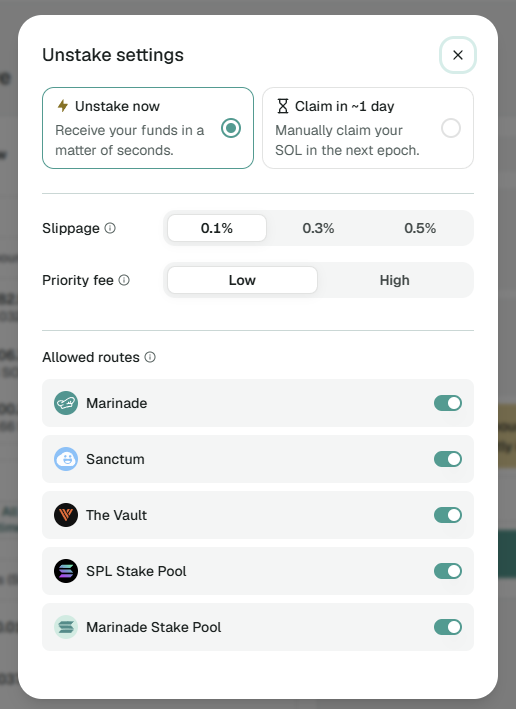
- Start an unstake from the Marinade app and choose Unstake now.
- Review the Receive amount, the best route found and how it compares with other routes. The quote refreshes automatically.
- For native stake, the app compares routes, including Marinade's order book and other stake pools.
- For mSOL, your route is built across one or more DEXes.
- Approve in your wallet. A larger native unstake can need several transactions, each with its own approval, shown as 1/N.
- For native stake, the app shows Processing… while your stake sells, then the SOL you received.
If Your Stake Does Not Sell Right Away
On the Marinade route, most native unstakes sell within seconds. If yours has not sold after a few seconds, the app shows Waiting for your stake to sell.
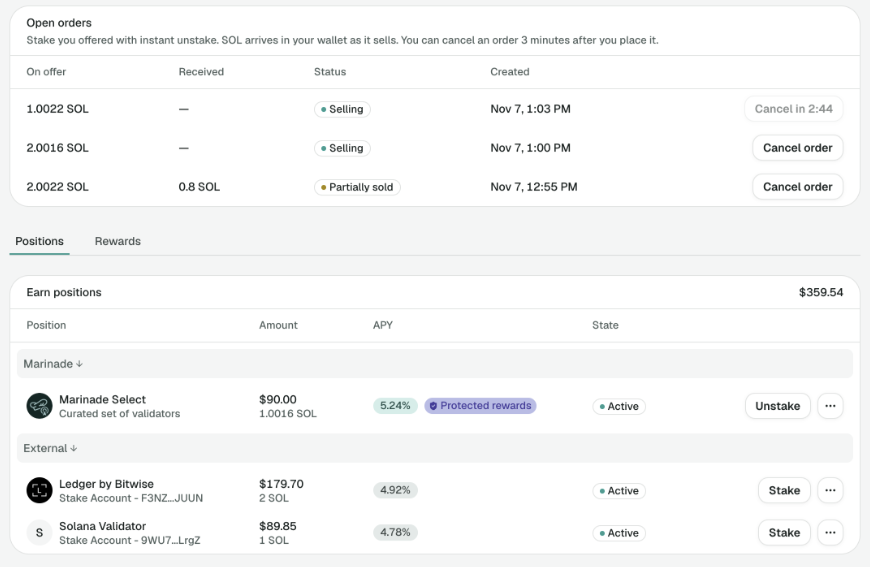
- You can close the window. Your stake stays on offer until it sells or you cancel it. Offers do not expire.
- Your stake keeps earning while it is on offer.
- While it is on offer, the stake leaves your positions and shows in the Open orders card on Portfolio, above the tabs, under On offer. Status Selling means nothing has sold yet. Partially sold means part has sold and that SOL is already in your wallet.
- Cancel is available 3 minutes after the order was created. Unsold stake returns to your wallet as stake. SOL you already received stays with you.
If the App Offers a Different Amount
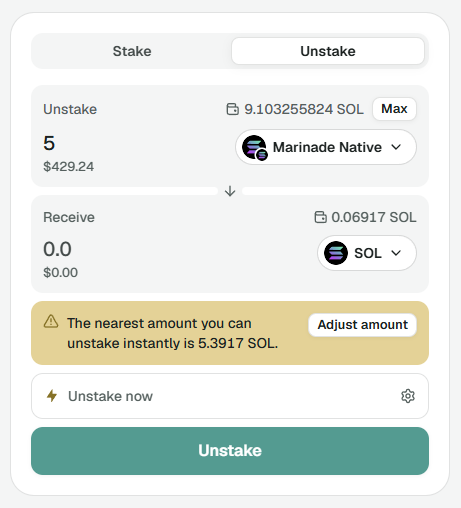
Instant Unstake can split stake accounts, so it can usually sell the amount you type. The app shows The nearest amount you can unstake instantly is X SOL with an Adjust amount button when:
- your amount is below the minimum and gets rounded up,
- a stake account can't be split because the remainder would be too small, or
- less stake can be sold than you asked for.
X can be higher or lower than what you typed. Click Adjust amount to use it, or choose Delayed Unstake for the exact amount.
If Instant Unstake Is Paused
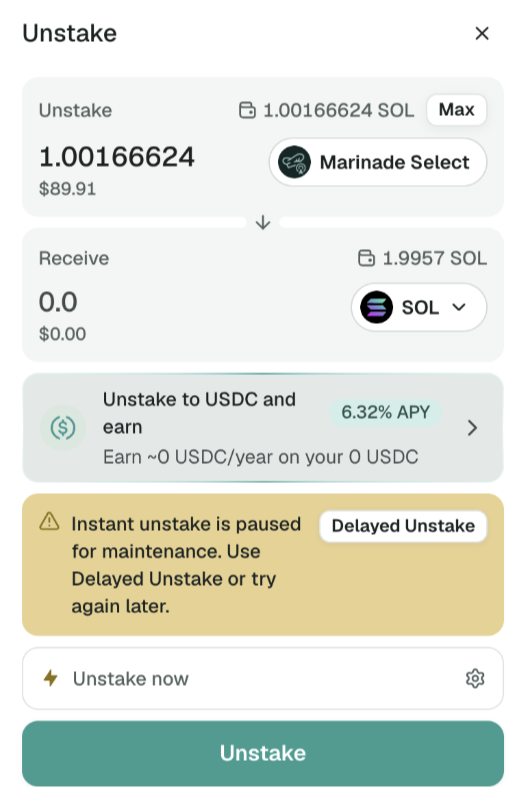
On rare occasions the form shows "Instant unstake is paused for maintenance. Use Delayed Unstake or try again later." Use the Delayed Unstake button next to it, or try again later.
Things To Keep In Mind
- You can always switch to Delayed Unstake if you do not like the Instant Unstake amount.
- Instant = SOL now, usually within seconds. On Marinade Native and Select it typically costs 0.10% to 0.40%, shown as a percentage next to Unstake now. On the Marinade route, you receive your stake's market value minus a small protocol fee and a small listing rent on each unstake, which is not returned. Network and priority fees come on top. See Fees and Pricing for the current figures. mSOL Instant Unstake has no Marinade fee, only the DEX spread.
- Delayed Unstake = SOL after one epoch, and you must come back to claim. It costs a flat 0.003 SOL for Marinade Native and Marinade Select (charged from your wallet's SOL balance), and 0.2% for Marinade Liquid (mSOL).
- For a native Instant Unstake, your wallet's approval screen can list each stake account going out, warn that you are giving control of your staking account to a third party, or show only a small SOL charge. It does not show the SOL coming back, because that arrives when a buyer fills your order. This is expected when you started the unstake yourself on app.marinade.finance and the amount matches what the app showed you. If you did not start the transaction yourself, or the site is not app.marinade.finance, cancel. If you would rather not approve that screen, use Delayed Unstake.